TikTok Stream Key Tool Features
Every GoLive Bridge feature serves one goal: get your mobile live stream's TikTok stream key into OBS as fast and accurately as possible.
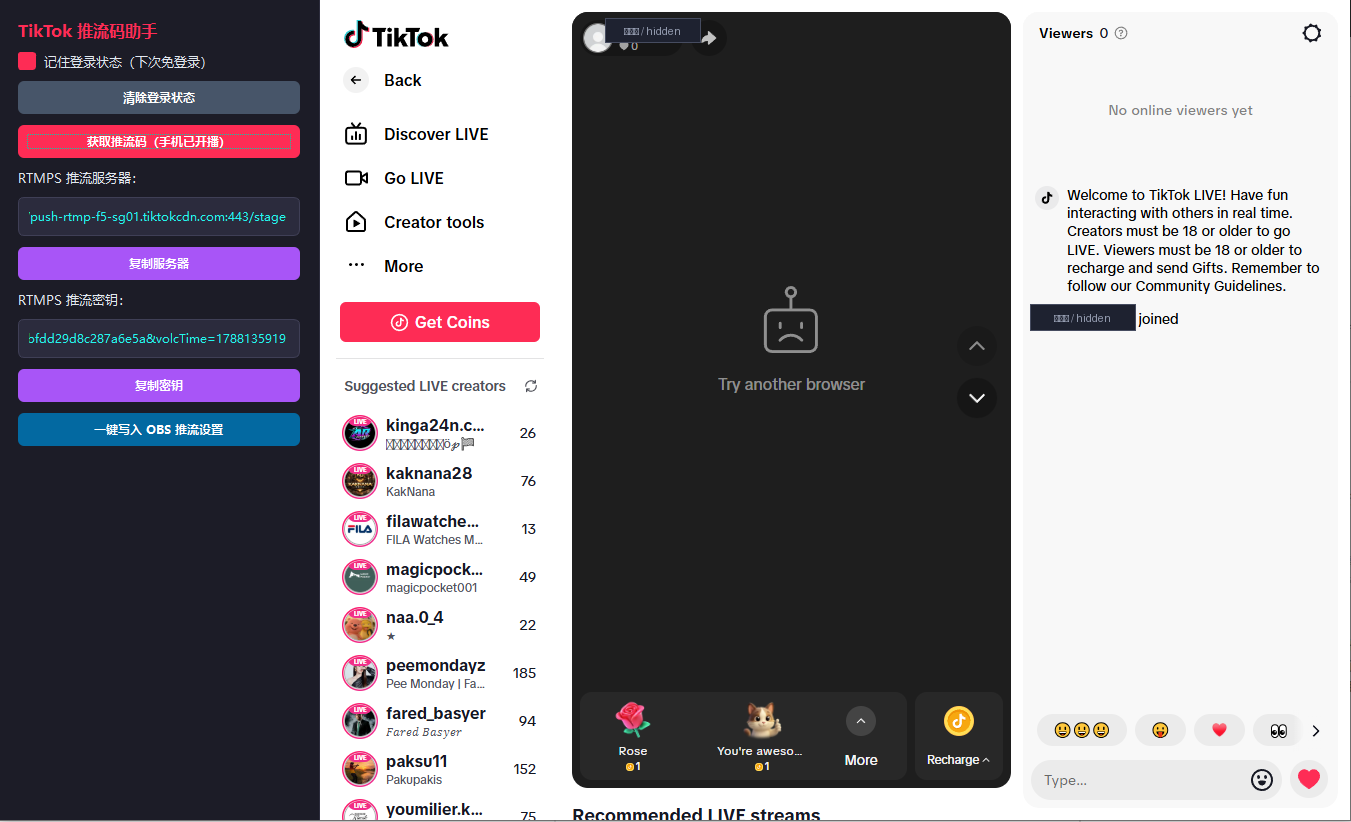
Auto-fetch the live server and key
Once you go live on TikTok mobile, GoLive Bridge automatically reads the stream server address and key for that session — no digging through nested settings pages.
One-click write to OBS
Once retrieved, the parameters are written into your local OBS Studio stream settings in one click, avoiding the stray spaces, truncation, or stale links that come with manual copy-pasting.
Save your TikTok login session
Your login is saved locally, so daily streaming doesn't require signing in every time — one less thing to do before you go live.
Automatic updates
Built-in update checks let you update in-app as soon as a new version ships, keeping pace with changes on TikTok's side.
Multiple license lengths
Monthly, Quarterly, and Yearly plans cover everything from a short trial run to long-term stable use — see the pricing page.
Optimized for Windows desktops
Purpose-built for Windows 10 / 11 64-bit and designed to work alongside mainstream versions of OBS Studio.
GoLive Bridge does not offer or promise any way to bypass TikTok's permission review, risk controls, or regional restrictions — every feature runs on top of live access you already legally hold.